TODO: this plugin tutorial is in progress, some information might be missing, we are actively working on it now. If you have any questions regarding this plugin, please reach out to us in GitHub issues
Agent Plugin
This plugin adds an AI agent with a chat surface to AdminForth which is capable of default skills like searching/editing data and extending with custom skills.
It stores session history in your own resources and generates responses using one of the configured modes.
The agent works through the tools and skills of the MCP Server plugin: for every turn it opens an in-process MCP connection as the signed-in user, so the same permissions, hooks and validation apply.
Installation
pnpm add @adminforth/agent --save
pnpm add @adminforth/mcp --save
pnpm add @adminforth/completion-adapter-openai-responses --save
Set up the MCP plugin as described in MCP Server. The agent does not start without it.
Add your LLM credentials to .env:
...
OPENAI_API_KEY=your_key
Each mode accepts any AdminForth completion adapter, so you can replace the OpenAI adapter with another adapter from List of adapters.
Setup
First create two resources for sessions and turns:
import AdminForth, { AdminForthDataTypes } from 'adminforth';
import type { AdminForthResourceInput, AdminUser } from 'adminforth';
import { randomUUID } from 'crypto';

async function allowedForSuperAdmins({ adminUser }: { adminUser: AdminUser }): Promise<boolean> {
  return adminUser.dbUser.role === 'superadmin';
}

export default {
  dataSource: 'maindb',
  table: 'sessions',
  resourceId: 'sessions',
  label: 'Sessions',
  columns: [
    {
      name: 'id',
      primaryKey: true,
      type: AdminForthDataTypes.STRING,
      fillOnCreate: () => randomUUID(),
      showIn: {
        edit: false,
        create: false,
      },
    },
    {
      name: 'title',
      type: AdminForthDataTypes.STRING,
    },
    {
      name: 'turns',
      type: AdminForthDataTypes.INTEGER,
    },
    {
      name: 'asker_id',
      type: AdminForthDataTypes.STRING,
    },
    {
      name: 'created_at',
      type: AdminForthDataTypes.DATETIME,
      fillOnCreate: () => (new Date()).toISOString(),
      showIn: {
        edit: false,
        create: false,
      },
    },
  ],
  options: {
    allowedActions: {
      list: allowedForSuperAdmins,
      show: allowedForSuperAdmins,
      create: false,
      edit: false,
      delete: false,
    },
  },
} as AdminForthResourceInput;
import AdminForth, { AdminForthDataTypes } from 'adminforth';
import type { AdminForthResourceInput, AdminUser } from 'adminforth';
import { randomUUID } from 'crypto';

async function allowedForSuperAdmins({ adminUser }: { adminUser: AdminUser }): Promise<boolean> {
  return adminUser.dbUser.role === 'superadmin';
}

export default {
  dataSource: 'maindb',
  table: 'turns',
  resourceId: 'turns',
  label: 'Turns',
  columns: [
    {
      name: 'id',
      primaryKey: true,
      type: AdminForthDataTypes.STRING,
      fillOnCreate: () => randomUUID(),
      showIn: {
        edit: false,
        create: false,
      },
    },
    {
      name: 'session_id',
      type: AdminForthDataTypes.STRING,
    },
    {
      name: 'created_at',
      type: AdminForthDataTypes.DATETIME,
      fillOnCreate: () => (new Date()).toISOString(),
      showIn: {
        edit: false,
        create: false,
      },
    },
    {
      name: 'prompt',
      type: AdminForthDataTypes.TEXT,
    },
    {
      name: 'response',
      type: AdminForthDataTypes.TEXT,
    },
    {
      name: 'checkpoint_id',
      type: AdminForthDataTypes.STRING,
      showIn: {
        list: false,
        show: true,
        edit: false,
        create: false,
        filter: false,
      },
    },
  ],
  options: {
    allowedActions: {
      list: allowedForSuperAdmins,
      show: allowedForSuperAdmins,
      create: false,
      edit: false,
      delete: false,
    },
  },
} as AdminForthResourceInput;
asker_id must store the current admin user's primary key, and created_at should be filled automatically because the plugin sorts sessions and turns by it. The turns field can stay nullable, but the plugin configuration still expects it. The optional checkpoint_id field stores the checkpoint attached to each visible turn and enables editing or forking old messages when checkpointResource is configured.
Add matching tables to your schema:
model sessions {
  id         String   @id
  title      String
  turns      Int?
  asker_id   String
  created_at DateTime
}

model turns {
  id            String   @id
  session_id    String
  created_at    DateTime
  prompt        String?
  response      String?
  checkpoint_id String?
}
Run migration:
pnpm makemigration --name add-adminforth-agent-tables ; pnpm migrate:local
Register both resources in your app:
import sessions_resource from './resources/agent_resources/sessions.js';
import turns_resource from './resources/agent_resources/turns.js';

export const admin = new AdminForth({
  ...
  resources: [
    ...
    sessions_resource,
    turns_resource,
  ],
  ...
});
Then attach the plugin once in index.ts as global plugin:
Configure the plugin with modes. The legacy top-level completionAdapter setup is no longer used.
import AdminForthAgent from '@adminforth/agent';
import CompletionAdapterOpenAIResponses from '@adminforth/completion-adapter-openai-responses';

...

globalPlugins: [
  ...
  new AdminForthAgent({
    // optional, can be used to suggest example prompts in the UI
    // placeholderMessages: async ({ adminUser, httpExtra }) => {
    //   return [
    //     'What is a cars count in SQLite',
    //     'Build average car price by days chart in SQLite',
    //   ];
    // },
    modes: [
      {
        name: 'Balanced',
        completionAdapter: new CompletionAdapterOpenAIResponses({
          openAiApiKey: process.env.OPENAI_API_KEY as string,
          model: 'gpt-5.4-mini',
          extraRequestBodyParameters: {
            reasoning: {
              effort: 'medium',
            },
          },
        }),
      },
      {
        name: 'Fast',
        completionAdapter: new CompletionAdapterOpenAIResponses({
          openAiApiKey: process.env.OPENAI_API_KEY as string,
          model: 'gpt-5.4-mini',
          extraRequestBodyParameters: {
            reasoning: {
              effort: 'low',
            },
          },
        }),
      },
      {
        name: 'Smart Thinking',
        completionAdapter: new CompletionAdapterOpenAIResponses({
          openAiApiKey: process.env.OPENAI_API_KEY as string,
          model: 'gpt-5.4',
          extraRequestBodyParameters: {
            reasoning: {
              effort: 'xhigh',
            },
          },
        }),
      },
    ],
    maxTokens: 10000,
    sessionResource: {
      resourceId: 'sessions',
      idField: 'id',
      titleField: 'title',
      turnsField: 'turns',
      askerIdField: 'asker_id',
      createdAtField: 'created_at',
    },
    turnResource: {
      resourceId: 'turns',
      idField: 'id',
      sessionIdField: 'session_id',
      createdAtField: 'created_at',
      promptField: 'prompt',
      responseField: 'response',
      // optional
      // debugField: 'debug',
      checkpointIdField: 'checkpoint_id',
    },
    // optional, see the "Persistent checkpointer" section below
    // checkpointResource: { ... },
  }),
]
Each item in modes defines a user-selectable preset in the chat UI. The selected mode is sent to the backend and the plugin uses that mode's completionAdapter for the response.
The plugin adds a chat surface to the admin UI, keeps session history per admin user, and shows a mode picker when modes are configured.
Chat surfaces (Telegram, etc.)
By default, the Agent plugin exposes a chat surface inside the AdminForth admin UI. If you want to talk to the same agent from external chat products (Telegram, Slack, Teams, etc.), configure both:
- a chat surface adapter that receives messages from the external chat product
- an OAuth adapter for the same provider so users can connect that external account in Connected Accounts
For example, Telegram Agent access needs both @adminforth/chat-surface-adapter-telegram and @adminforth/oauth-adapter-telegram.
Register adapters through chatSurfaceAdapters:
import AdminForthAgent from '@adminforth/agent';
import TelegramChatSurfaceAdapter from '@adminforth/chat-surface-adapter-telegram';

new AdminForthAgent({
  // ...modes, sessionResource, turnResource, etc.
  chatSurfaceAdapters: [
    new TelegramChatSurfaceAdapter({
      botToken: process.env.TELEGRAM_BOT_TOKEN as string,
      webhookSecret: process.env.TELEGRAM_WEBHOOK_SECRET,
    }),
  ],
  chatExternalIdentityResource: {
    resourceId: 'admin_user_external_identities',
    surfaces: {
      telegram: {
        provider: 'AdminForthAdapterTelegramOauth2',
      },
    },
  },
});
External chat users are resolved through the OAuth external identities resource. The provider value in chatExternalIdentityResource.surfaces must match the OAuth adapter class that writes connected accounts, for example AdminForthAdapterTelegramOauth2.
Users connect their Telegram account from Settings -> Connected Accounts. After that, messages from the Telegram bot can be matched to the AdminForth user through the external identity externalUserId.
For Telegram setup, including required user fields, webhook URL, environment variables, and adapter options, see:
Debugging agent turns
Agent debug traces are optional and are intended for auditability and debugging. When enabled, they let you reconstruct why an agent produced a response or made a change by storing the full execution sequence for the turn: LLM steps, tool calls, tool inputs and outputs, token usage, and cache information.
By default, only the user prompt and agent response are persisted. Full debug traces are not stored unless you configure a debugField, because they can be large and may significantly increase database size.
Add a debug JSON column to the turns resource:
import AdminForth, { AdminForthDataTypes } from 'adminforth';
import type { AdminForthResourceInput, AdminUser } from 'adminforth';
import { randomUUID } from 'crypto';

async function allowedForSuperAdmins({ adminUser }: { adminUser: AdminUser }): Promise<boolean> {
  return adminUser.dbUser.role === 'superadmin';
}

export default {
  dataSource: 'maindb',
  table: 'turns',
  resourceId: 'turns',
  label: 'Turns',
  columns: [
    {
      name: 'id',
      primaryKey: true,
      type: AdminForthDataTypes.STRING,
      fillOnCreate: () => randomUUID(),
      showIn: {
        edit: false,
        create: false,
      },
    },
    {
      name: 'session_id',
      type: AdminForthDataTypes.STRING,
    },
    {
      name: 'created_at',
      type: AdminForthDataTypes.DATETIME,
      fillOnCreate: () => (new Date()).toISOString(),
      showIn: {
        edit: false,
        create: false,
      },
    },
    {
      name: 'prompt',
      type: AdminForthDataTypes.TEXT,
    },
    {
      name: 'response',
      type: AdminForthDataTypes.TEXT,
    },
    {
      name: 'debug',
      type: AdminForthDataTypes.JSON,
      components: {
        show: {
          file: '@@/TurnDebugShow.vue',
        },
      },
      showIn: {
        list: false,
        show: true,
        edit: false,
        create: false,
        filter: false,
      },
    },
  ],
  options: {
    allowedActions: {
      list: allowedForSuperAdmins,
      show: allowedForSuperAdmins,
      create: false,
      edit: false,
      delete: false,
    },
  },
} as AdminForthResourceInput;
Add the matching field to your schema:
model turns {
  id         String   @id
  session_id String
  created_at DateTime
  prompt     String?
  response   String?
  debug      Json? //diff-add
}
If you use SQLite with Prisma, store the same field as text:
model turns {
  id         String   @id
  session_id String
  created_at DateTime
  prompt     String?
  response   String?
  debug      String? //diff-add
}
AdminForth should still define this resource column as AdminForthDataTypes.JSON; the SQLite connector serializes it into the text column and parses it back for the renderer.
Run migration:
pnpm makemigration --name add-adminforth-agent-turn-debug ; pnpm migrate:local
Tell the plugin where to store debug data:
new AdminForthAgent({
  modes: [
    ...
  ],
  sessionResource: {
    resourceId: 'sessions',
    idField: 'id',
    titleField: 'title',
    turnsField: 'turns',
    askerIdField: 'asker_id',
    createdAtField: 'created_at',
  },
  turnResource: {
    resourceId: 'turns',
    idField: 'id',
    sessionIdField: 'session_id',
    createdAtField: 'created_at',
    promptField: 'prompt',
    responseField: 'response',
    debugField: 'debug',
  },
})
The debugField value must match the turns resource column name. You can use another column name, but then use the same name in the resource, database schema, and debugField.
Create a renderer in your app custom folder:
<template>
  <div class="space-y-3">
    <div class="rounded-lg bg-slate-50 p-3 text-sm text-slate-700 dark:bg-slate-800 dark:text-slate-200">
      <div class="font-semibold text-slate-900 dark:text-white">Agent Debug</div>
      <div class="mt-1">
        {{ debugSequences.length }} sequences,
        {{ totalToolCalls }} tool calls,
        {{ totalUncachedInputTokens.toLocaleString() }} uncached input tokens,
        {{ totalCachedInputTokens.toLocaleString() }} cached input tokens,
        {{ totalOutputTokens.toLocaleString() }} output tokens
      </div>
    </div>

    <JsonViewer :value="debugSequences" :expandDepth="2" />
  </div>
</template>

<script setup lang="ts">
import { computed } from 'vue';
import { JsonViewer } from '@/afcl';
import type { AdminForthResourceColumnCommon } from '@/types/Common';

type DebugToolCall = {
  toolName: string;
};

type DebugSequence = {
  uncachedInputTokens?: number;
  cachedInputTokens?: number;
  outputTokens?: number;
  cachedTokens: number;
  promptTokens: number;
  reasoningTokens: number;
  textTokens: number;
  toolCalls: DebugToolCall[];
};

const props = defineProps<{
  column: AdminForthResourceColumnCommon;
  record: Record<string, DebugSequence[]>;
}>();

const debugSequences = computed(() => props.record[props.column.name] ?? []);
const totalToolCalls = computed(() =>
  debugSequences.value.reduce((sum, sequence) => sum + sequence.toolCalls.length, 0),
);
const totalUncachedInputTokens = computed(() =>
  debugSequences.value.reduce((sum, sequence) => sum + sequenceUncachedInputTokens(sequence), 0),
);
const totalCachedInputTokens = computed(() =>
  debugSequences.value.reduce((sum, sequence) => sum + sequenceCachedInputTokens(sequence), 0),
);
const totalOutputTokens = computed(() =>
  debugSequences.value.reduce((sum, sequence) => sum + sequenceOutputTokens(sequence), 0),
);

function sequenceUncachedInputTokens(sequence: DebugSequence) {
  return sequence.uncachedInputTokens ?? Math.max(sequence.promptTokens - sequenceCachedInputTokens(sequence), 0);
}

function sequenceCachedInputTokens(sequence: DebugSequence) {
  return sequence.cachedInputTokens ?? sequence.cachedTokens;
}

function sequenceOutputTokens(sequence: DebugSequence) {
  return sequence.outputTokens ?? sequence.reasoningTokens + sequence.textTokens;
}
</script>
Using with self-hosted models
CompletionAdapterOpenAIResponses when works with agent plugin, under the hood uses the LangChain internal proxy called OpenAIChat (in LangChain they call it "provider"). This proxy is capable with a fresh versions of OpenAI-compatible Responses APIs, for example self-hosted latest versions of vLLM installations
To use them, just point the adapter to your local vLLM server:
completionAdapter: new CompletionAdapterOpenAIResponses({
  openAiApiKey: process.env.MY_API_KEY as string, // if you use authorization
  baseUrl: 'http://my_local_vllm_server:8000/v1',
  model: 'gpt-oss-120b',
})
However some of 3rd party providers might serve outdated vLLM and still don't fully support the Responses API needed for langchain internal implmentation, for example OVH AI Endpoints in Responses mode still don't play well with langchain proxy (25 Apr 2026)
In that case you can try to use the OpenAI Chat Completions API mode of the plugin, which is less efficient but more compatible with older APIs, you can force Chat Completions API mode with useCompletionApi: true:
completionAdapter: new CompletionAdapterOpenAIResponses({
  openAiApiKey: process.env.OVH_AI_ENDPOINTS_ACCESS_TOKEN as string,
  baseUrl: 'https://oai.endpoints.kepler.ai.cloud.ovh.net/v1',
  model: 'gpt-oss-120b',
  useCompletionApi: true,
})
OVH AI Endpoints still does not fully support the OpenAI responses API, so useCompletionApi: false may work unstably there.
Turn on audio chat support
If you want to have an ability to talk with agent usng voice, you can setup it:
- Install audio adapter:
pnpm add @adminforth/audio-adapter-openai
- Import it in your users resource and add to the plugin config
  import OpenAIAudioAdapter from '@adminforth/audio-adapter-openai'

  ...


  new AdminForthAgent({
    ...
    audioAdapter: new OpenAIAudioAdapter({
      apiKey: process.env.OPENAI_API_KEY as string,,
      defaultVoice: 'alloy',
      defaultSpeed: 1.25,
    }),
    ...
  }),
  ...
Writing own skills
You can write own skills by following SKILL.md Agennt Skills
For example we will write a skill which can summarizes backoffice data stats like record counts by resources and send it to user email.
It may handle prompts like
Please send record counts for all resources to my email
Or:
Please send record counts to all admin users
Writing custom tools
To define a custom tool, register an API endpoint with admin.express.endpoint. The endpoint schema makes the API visible in OpenAPI, and the MCP server exposes the endpoint handler as a tool to the agent and to other MCP clients.
admin.express.withSchema is useful when you already have a regular Express route and want it to appear in the generated OpenAPI document. However, a route registered only with withSchema is not a directly callable agent tool, because it does not register a direct OpenAPI handler. For agent tools, use admin.express.endpoint.
By default, admin.express.endpoint applies AdminForth authorization. The endpoint handler receives adminUser from the user who is controlling the agent. In other words, all permissions and access rights of the agent are defined by that admin user. At the same time, actions done by the agent are automatically attributed in the audit log to the admin user who is controlling the agent.
You can attach AdminForth agent metadata directly to the endpoint with the agent field.
type AgentToolMeta = {
  requiresHumanApproval?: boolean;
  hiddenFromAgents?: boolean;
  onlyReadsData?: boolean;
};
requiresHumanApproval: truemakes the agent ask the user for approval before it runs the tool. MCP clients receive thedestructiveHintannotation.hiddenFromAgents: truekeeps the endpoint out of agent tools, both in the agent and in the MCP server. Use it for endpoints that serve your admin panel UI and must not be called by agents.onlyReadsData: truedeclares that the endpoint does not change any data. MCP clients receive thereadOnlyHintannotation, and a read-only MCP server exposes only such endpoints.
To keep a whole resource away from the agent, set options.agent: { hiddenFromAgents: true } on it, as described in MCP Server. The plugin does it for its own session, turn and checkpoint resources.
This example uses the same email adapter pattern shown in the Email Invite and Email Password Reset plugins. The transport below uses Mailgun only to keep the snippet short; you can replace it with SES or any other adapter from List of adapters.
import { Filters, type IAdminForth } from 'adminforth';
import EmailAdapterMailgun from '@adminforth/email-adapter-mailgun';
const agentEmailAdapter = new EmailAdapterMailgun({
apiKey: process.env.MAILGUN_API_KEY as string,
domain: process.env.MAILGUN_DOMAIN as string,
baseUrl: process.env.MAILGUN_REGION_URL || 'api.mailgun.net',
});
const agentSendFrom = process.env.AGENT_SEND_FROM_EMAIL as string;
function escapeHtml(value: string) {
return value
.replace(/&/g, '&')
.replace(/</g, '<')
.replace(/>/g, '>');
}
function renderEmailHtml(body: string) {
return `<html><body><pre style="font-family: sans-serif; white-space: pre-wrap;">${escapeHtml(body)}</pre></body></html>`;
}
type SendEmailBody = {
userId: string;
subject: string;
body: string;
htmlBody?: string;
};
export function initApi(app: Express, admin: IAdminForth) {
admin.express.endpoint({
method: 'POST',
path: '/send_email_to_user',
description: 'Send an email to one AdminForth user by id. Use this after the user row is resolved.',
agent: {
requiresHumanApproval: true,
},
request_schema: {
type: 'object',
additionalProperties: false,
required: ['userId', 'subject', 'body'],
properties: {
userId: { type: 'string' },
subject: { type: 'string', minLength: 1 },
body: { type: 'string', minLength: 1 },
htmlBody: { type: 'string', minLength: 1 },
},
},
response_schema: {
type: 'object',
additionalProperties: false,
required: ['ok'],
properties: {
ok: { type: 'boolean' },
email: { type: 'string' },
error: { type: 'string' },
},
},
handler: async ({ body, response }) => {
const { userId, subject, body: emailBody, htmlBody } = body as SendEmailBody;
await agentEmailAdapter.validate();
const user = await admin.resource('adminuser').get(
Filters.EQ('id', userId),
);
if (!user) {
response.setStatus(404, 'User not found');
return { ok: false, error: 'User not found' };
}
const result = await agentEmailAdapter.sendEmail(
agentSendFrom,
user.email as string,
emailBody,
htmlBody ?? renderEmailHtml(emailBody),
subject,
);
if (!result.ok) {
response.setStatus(500, 'Failed to send email');
return { ok: false, error: result.error ?? 'Failed to send email' };
}
return { ok: true, email: user.email };
},
});
}
Define skills instructions
Skills are served by the MCP server, so the agent and other MCP clients load them with fetch_skill. Custom skills live in your app's custom directory:
custom/skills/<skill_name>/SKILL.md
Plugins expose their own skills the same way, from custom/skills/<skill_name>/SKILL.md of the plugin. A skill whose name is already taken by the MCP server or by an earlier folder is skipped.
Each skill needs YAML frontmatter with name and description. The description is the discovery surface, so include the phrases the admin is likely to type in chat. Skills are not loaded automcatically, agent loads them
on demand once understands that description of the skill matches the user intent, so keep the description clear and concise.
Tools are also not loaded automatically, the agent loads them only if they are mentioned in the skill instructions. Then agent calls fetch_tool_schema meta tool to load actual schema of your custom tool.
Tool names are derived from route paths. If you want the tool name to be exactly send_email_to_user, register the route as /send_email_to_user.
The example below creates a minimal user skill which:
- resolves a user row
- reads the
totalcount for each resource withget_resource_data - sends the final report by email with
send_email_to_user
Create the skill in your app custom folder:
---
name: email_resource_counts
description: Email record counts for each AdminForth resource to a user. Use when the user asks to send resource counts or all-record statistics by email.
---

# Involved tools

Use `send_email_to_user` to send the final report after you have one exact target user row.

# Instructions

- For each resource in system use the standard `analyze-data` skill to collect total count of records in each resource.
- Create both a plain text report and an HTML report in format `Resource Label (resourceId): count` for each resource on a new line, sort resources by count in descending order.
- Use modern, stylish but compatible html formatting in the email.
- Call `send_email_to_user` with the resolved user primary key, the final subject, the final plain text `body`, and the final HTML markup in `htmlBody`.
- After the tool succeeds, tell the user the email was sent and include a short summary in chat.
This way allows to extend your agent with literally any custom instructions and tools and make it do complex tasks related to your backoffice data and operations.
Standard skills
The MCP server ships standard skills from plugins/adminforth-mcp/custom/skills/. These are available out of the box and can be combined with your own custom skills.
| Skill name | Description |
|---|---|
analyze-data | Answer counts, sums, averages, trends, distributions and comparisons with aggregate. |
fetch-data | Find, list and show records with get_resource_data. |
mutate-data | Create, update or delete records and run custom actions. The agent loads it before any change. |
Guidance on charts is part of the agent's own system prompt, so the agent can draw charts from the data it loads.
Persistent agent memory
The plugin stores visible chat history in the sessions and turns resources. This is what users see in the chat sidebar and in old conversations.
The agent also needs its own internal conversation state to continue an existing chat. If you do not configure checkpointResource, that internal state is kept only in the Node.js process memory. This is fine for local testing and for new chats, but it is not durable:
- after a server restart, users can still see old chat messages because
sessionsandturnsare stored in your database - after a server restart, users can continue an old chat, but the agent will treat it like a new conversation because its internal state was lost
- new chats will work normally again until the next restart
For production, configure checkpointResource so the agent can safely continue old chats after restarts and deployments.
You can use your own table and field names. The plugin does not require a specific schema name, only a mapping for these logical fields:
idFieldthreadIdFieldcheckpointNamespaceFieldcheckpointIdFieldparentCheckpointIdFieldrowKindFieldtaskIdFieldsequenceFieldcreatedAtFieldcheckpointPayloadFieldmetadataPayloadFieldwritesPayloadFieldschemaVersionField
Create a resource for checkpoint rows:
import { AdminForthDataTypes } from 'adminforth';
import type { AdminForthResourceInput } from 'adminforth';

export default {
  dataSource: 'maindb',
  table: 'agent_checkpoints',
  resourceId: 'agent_checkpoints',
  label: 'Agent Checkpoints',
  recordLabel: (record) => record.id,
  options: {
    allowedActions: {
      create: false,
      edit: false,
    },
  },
  columns: [
    {
      name: 'id',
      primaryKey: true,
      type: AdminForthDataTypes.STRING,
      showIn: {
        edit: false,
        create: false,
      },
    },
    {
      name: 'thread_id',
      type: AdminForthDataTypes.STRING,
    },
    {
      name: 'checkpoint_namespace',
      type: AdminForthDataTypes.STRING,
    },
    {
      name: 'checkpoint_id',
      type: AdminForthDataTypes.STRING,
    },
    {
      name: 'parent_checkpoint_id',
      type: AdminForthDataTypes.STRING,
    },
    {
      name: 'row_kind',
      type: AdminForthDataTypes.STRING,
      enum: [
        { value: 'checkpoint', label: 'Checkpoint' },
        { value: 'writes', label: 'Writes' },
      ],
    },
    {
      name: 'task_id',
      type: AdminForthDataTypes.STRING,
    },
    {
      name: 'sequence',
      type: AdminForthDataTypes.INTEGER,
    },
    {
      name: 'created_at',
      type: AdminForthDataTypes.DATETIME,
      showIn: {
        edit: false,
        create: false,
      },
    },
    {
      name: 'checkpoint_payload',
      type: AdminForthDataTypes.JSON,
      showIn: {
        list: false,
      },
    },
    {
      name: 'metadata_payload',
      type: AdminForthDataTypes.JSON,
      showIn: {
        list: false,
      },
    },
    {
      name: 'writes_payload',
      type: AdminForthDataTypes.JSON,
      showIn: {
        list: false,
      },
    },
    {
      name: 'schema_version',
      type: AdminForthDataTypes.INTEGER,
    },
  ],
} as AdminForthResourceInput;
Add a matching table to your schema:
model agent_checkpoints {
  id                   String   @id
  thread_id            String
  checkpoint_namespace String
  checkpoint_id        String
  parent_checkpoint_id String?
  row_kind             String
  task_id              String?
  sequence             Int
  created_at           DateTime
  checkpoint_payload   String?
  metadata_payload     String?
  writes_payload       String?
  schema_version       Int

  @@index([thread_id, checkpoint_namespace, checkpoint_id])
}
The payload fields can be stored as strings. The plugin serializes and deserializes checkpoint JSON on its own. The composite index on (thread_id, checkpoint_namespace, checkpoint_id) is recommended because the checkpointer filters rows by these columns.
Run migration:
pnpm makemigration --name add-adminforth-agent-checkpoints ; pnpm migrate:local
Register the resource in your app:
import checkpoints_resource from './resources/agent_resources/checkpoints.js';
import sessions_resource from './resources/agent_resources/sessions.js';
import turns_resource from './resources/agent_resources/turns.js';

export const admin = new AdminForth({
  ...
  resources: [
    ...
    sessions_resource,
    turns_resource,
    checkpoints_resource,
  ],
  ...
});
Then connect it to the plugin:
new AdminForthAgent({
  modes: [
    ...
  ],
  sessionResource: {
    resourceId: 'sessions',
    idField: 'id',
    titleField: 'title',
    turnsField: 'turns',
    askerIdField: 'asker_id',
    createdAtField: 'created_at',
  },
  turnResource: {
    resourceId: 'turns',
    idField: 'id',
    sessionIdField: 'session_id',
    createdAtField: 'created_at',
    promptField: 'prompt',
    responseField: 'response',
    checkpointIdField: 'checkpoint_id',
  },
  checkpointResource: {
    resourceId: 'agent_checkpoints',
    idField: 'id',
    threadIdField: 'thread_id',
    checkpointNamespaceField: 'checkpoint_namespace',
    checkpointIdField: 'checkpoint_id',
    parentCheckpointIdField: 'parent_checkpoint_id',
    rowKindField: 'row_kind',
    taskIdField: 'task_id',
    sequenceField: 'sequence',
    createdAtField: 'created_at',
    checkpointPayloadField: 'checkpoint_payload',
    metadataPayloadField: 'metadata_payload',
    writesPayloadField: 'writes_payload',
    schemaVersionField: 'schema_version',
  },
});
If your existing checkpoint table already uses different column names, keep your schema and only change the field mapping in checkpointResource.
Reverse proxy and CDN configuration for streaming
The agent streams responses from <baseURL>/adminapi/v1/agent/response using server-sent events, where <baseURL> is your AdminForth base path or an empty string when deployed at the domain root. Voice mode also streams from <baseURL>/adminapi/v1/agent/speech-response after uploading the recorded audio. If your proxy buffers responses, the UI will receive the answer only after generation is finished.
For Nginx, disable response buffering on both endpoints. The critical line is proxy_buffering off;.
location <baseURL>/adminapi/v1/agent/response {
  proxy_http_version 1.1;
  proxy_read_timeout 600s;
  proxy_set_header X-Forwarded-For $proxy_add_x_forwarded_for;
  proxy_set_header Host $http_host;
  proxy_set_header Connection "";
  proxy_buffering off;  # required for streaming
  proxy_pass http://127.0.0.1:3500;
}

location <baseURL>/adminapi/v1/agent/speech-response {
  proxy_http_version 1.1;
  proxy_read_timeout 600s;
  proxy_set_header X-Forwarded-For $proxy_add_x_forwarded_for;
  proxy_set_header Host $http_host;
  proxy_set_header Connection "";
  proxy_buffering off;  # required for streaming voice responses
  proxy_pass http://127.0.0.1:3500;
}
Traefik forwards streaming responses immediately by default. The line that must stay off these routes is any buffering middleware attachment such as traefik.http.routers.adminforth-agent.middlewares=buffering@docker. If your main router uses extra middlewares, create a dedicated router for the agent stream endpoints and do not attach buffering to it:
services:
  adminforth:
    labels:
      - "traefik.enable=true"
      - "traefik.http.services.adminforth.loadbalancer.server.port=3500"

      - "traefik.http.routers.adminforth.rule=PathPrefix(`/`)"
      - "traefik.http.routers.adminforth.tls=true"
      - "traefik.http.routers.adminforth.tls.certresolver=myresolver"
      - "traefik.http.routers.adminforth.middlewares=secure-headers,buffering@docker"

      - "traefik.http.routers.adminforth-agent.rule=Path(`<baseURL>/adminapi/v1/agent/response`) || Path(`<baseURL>/adminapi/v1/agent/speech-response`)"
      - "traefik.http.routers.adminforth-agent.priority=100"
      - "traefik.http.routers.adminforth-agent.service=adminforth"
      - "traefik.http.routers.adminforth-agent.tls=true"
      - "traefik.http.routers.adminforth-agent.tls.certresolver=myresolver"
      # keep buffering OFF for SSE
      # do not add:
      # - "traefik.http.routers.adminforth-agent.middlewares=buffering@docker"
Replace <baseURL> with the same base path you use for AdminForth. For example, when ADMIN_BASE_URL = '/admin/', the endpoints become /admin/adminapi/v1/agent/response and /admin/adminapi/v1/agent/speech-response.
CDN
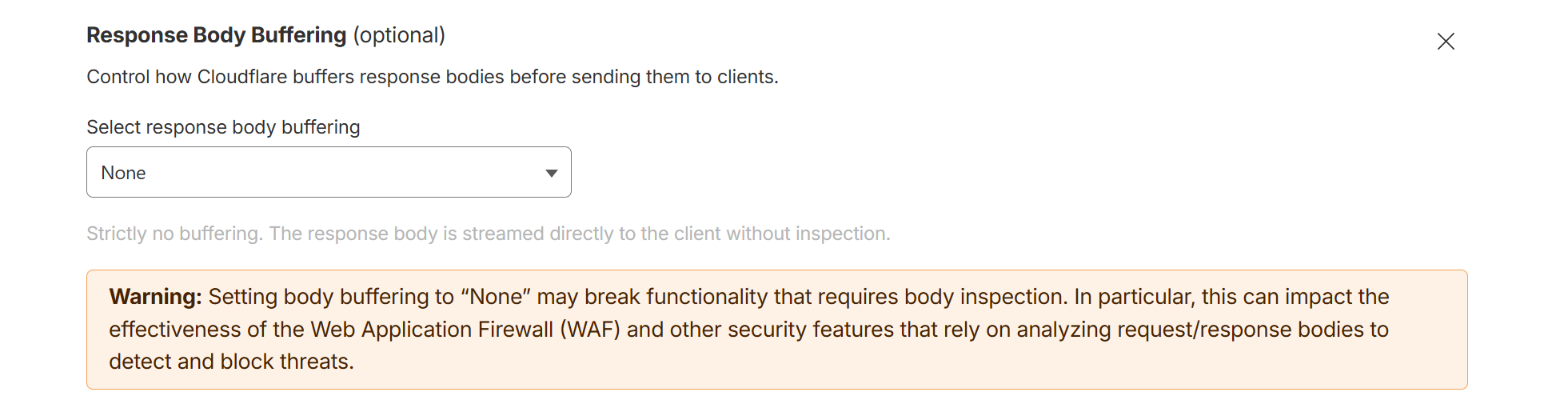
Cloudflare by default buffers responses, which breaks streaming. To fix it, create a page rule for your domain with a "Response Body Buffering" setting turned off for the agent stream endpoints (<baseURL>/adminapi/v1/agent/response and <baseURL>/adminapi/v1/agent/speech-response).
If Cloudflare returns a 403 response with cf-mitigated: challenge for <baseURL>/adminapi/v1/agent/speech-response, the request was blocked before it reached AdminForth. Create a WAF or bot rule exception for authenticated requests to this endpoint, because browser fetch calls with multipart/form-data cannot complete an HTML challenge page.