Foreign Inline List
Foreign inline list plugin allows to display a list (table) of items from a foreign table in the show view.
Usage
Import plugin:
pnpm add @adminforth/foreign-inline-list --save
import ForeignInlineListPlugin from '@adminforth/foreign-inline-list';
import { AdminForthResource, AdminForthResourceColumn } from 'adminforth';
In Getting Started we created a 'aparts' resource which has a field 'realtor_id'.
This field refers to record from 'adminuser' resource. To remind you, we configured this relation using foreignResource setting in the column configuration:
//
export default {
  resourceId: 'aparts',
  ...
  columns: [
    ...
    {
      name: 'realtor_id',
      foreignResource: {
        resourceId: 'adminuser',  // this means that aparts.realtor_id refers to primary key of 'adminuser' resource
                              // this is Many-To-One relatin: many aparts can refer to one user
      }
    }
  ],
}
This means that we can display a list of apartments in the user's show view.
Add to your 'adminuser' resource configuration the plugin instance:
{
    ...
    resourceId: 'adminuser',
    ...
    plugins: [
      new ForeignInlineListPlugin({
        foreignResourceId: 'aparts',
        modifyTableResourceConfig: (resourceConfig: AdminForthResource) => {
          // hide column 'square_meter' from both 'list' and 'filter'
          const column = resourceConfig.columns.find((c: AdminForthResourceColumn) => c.name === 'square_meter')!.showIn = { all: false };
          resourceConfig.options!.listPageSize = 1;
          // feel free to console.log and edit resourceConfig as you need
        },
      }),
    ],
}
You can use the modifyTableResourceConfig callback to modify which columns to show in the list and filter of the foreign table.
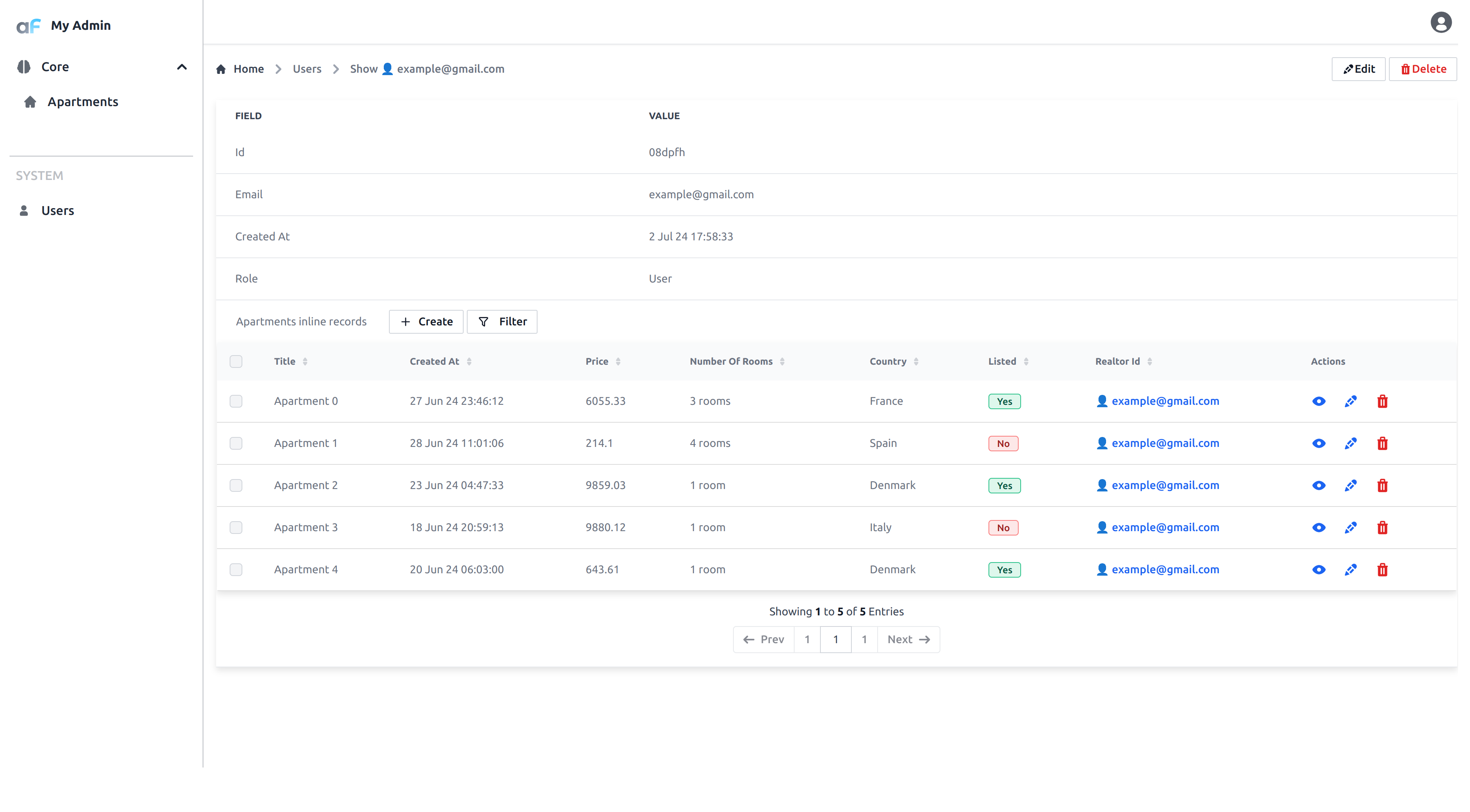
👆 To make plugin work, the specified resource (defined with
foreignResourceId) should have one (and only one) column that refers to the current resource on which you add a plugin. In our case we add plugin toadminuserresource, so theapartsresource should have one column withforeignResource.resourceIdequal toadminuserresourceId.
Default filters
If you need to add default filters for the foreign resource based on your current record (for example show apartment only from Italy, when user have country Italy), you can use defaultFilters callback:
👆 This example won't work until you'll add counrty field in your adminuser resource and it's only for demonstrating concept of callback
  ...

  new ForeignInlineListPlugin({

    ...
      defaultFilters: (record: any) => {
        return [
          {
            field: "country",
            operator: AdminForthFilterOperators.EQ,
            value: record.country,
          }
        ]
      }

    ...

  })

  ...
👆It also makes sense to modify the table resource and hide the country field from filters, because this value is hardcoded and equals the country from the record:
  ...

  new ForeignInlineListPlugin({

    ...

    modifyTableResourceConfig: (resourceConfig: AdminForthResource) => {
      const column = resourceConfig.columns.find((c: AdminForthResourceColumn) => c.name === 'country')!.showIn = {
        list: true,
        show: true,
        edit: true,
        create: true,
        filter: false
      };
    },

    defaultFilters: (record: any) => {
      return [
        {
          field: "country",
          operator: AdminForthFilterOperators.EQ,
          value: record.country,
        }
      ]
    }

    ...

  })

  ...
Show table from another resource without any filters applied
There might be cases when you want to remove the default filter applied by the plugin and then use the defaultFilters callback to apply your own custom filters.
plugins: [
  new ForeignInlineListPlugin({
    foreignResourceId: 'aparts',
    disableForeignListResourceRefColumn: true
  }),
    ],
This setup will show, in the show view for each record, the aparts resource without any filters. And you don’t have to modify the aparts resource.
Cascade delete for foreign resources
There might be cases when you want to control what happens with child records when a parent record is deleted.
You can configure this behavior in the foreignResource section using the onDelete option.
export default {
  resourceId: 'aparts',
  ...
  columns: [
    ...
    {
      name: 'realtor_id',
      foreignResource: {
        resourceId: 'adminuser',
        onDelete: 'cascade' // cascade or setNull
      }
    }
  ],
}
The onDelete option supports two modes:
cascade: When a parent record is deleted, all related child records will be deleted automatically.setNull: When a parent record is deleted, child records will remain, but their foreign key will be set to null.